Cinematic double exposure photography has captured millions of imaginations with its dreamlike, layered visuals that merge two worlds into one striking frame. What once required professional Photoshop expertise can now be achieved effortlessly using AI.
These photo editing prompts to create cinematic double exposure images unleash creative possibilities for anyone — letting you craft viral 4K visuals with DSLR-quality depth, color, and emotion. Whether you’re working on romantic portraits, moody urban scenes, or artistic Instagram edits, these prompts guarantee cinematic brilliance that grabs attention instantly.
10 Cinematic Double Exposure Gemini AI Photo Editing Prompts
Prompt 1: Post-Apocalyptic Urban Warrior
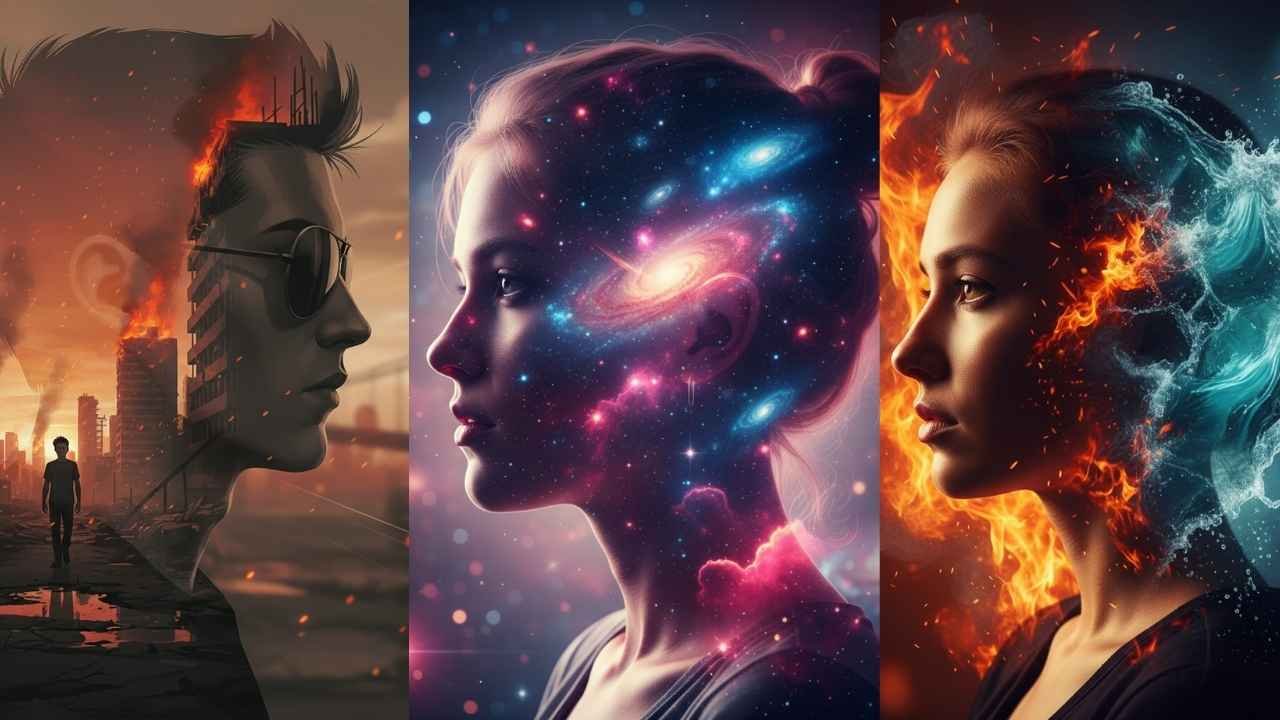
Create a cinematic 4K double exposure digital artwork featuring a young man’s side profile wearing sunglasses, seamlessly blended with a dramatic post-apocalyptic cityscape inside his silhouette. The inner silhouette reveals the same person walking through destroyed streets with burning buildings, glowing embers, and fire. Use DSLR depth f/1.4, moody warm sunset lighting, and 8K concept-art textures.

Prompt 2: Mystical Forest Portrait
Generate a black-and-white 4K double exposure portrait of a man’s profile facing left, merged with a dense pine forest landscape. Trees rise from his temples, and a flock of birds flies across the sky within his silhouette. Apply DSLR f/2.0 depth, soft contrast, and an artistic, reflective mood — keeping the face 100% accurate.
Prompt 3: Romantic Sunset Beach Fusion
Create a romantic 4K double exposure portrait of a couple standing on the beach, their silhouettes filled with sunset tones, ocean waves, and flying seagulls. Use DSLR bokeh f/1.8, golden hour lighting, soft orange hues, dreamy atmosphere, and cinematic depth of field for viral Instagram aesthetics.
Prompt 4: City Lights Night Vision
Make a dramatic 4K portrait of a boy’s side profile merged with glowing city skylines, neon lights, and traffic trails. Capture DSLR night depth f/1.4 with cool blue and purple tones, sharp facial lighting, and a moody urban feel — perfect for cinematic storytelling.
Prompt 5: Cosmic Space Explorer
Design a futuristic 4K double exposure image blending a person’s profile with cosmic nebulae, stars, and swirling galaxies. Add DSLR shallow depth f/1.8, vibrant pink and blue hues, glowing effects, and a dreamy sci-fi tone for a visually mesmerizing result.
Prompt 6: Mountain Adventure Spirit
Craft a 4K portrait with a man’s silhouette merged with majestic mountains, pine forests, and soaring eagles. Highlight DSLR depth f/2.0, natural cold-blue tones, and dramatic sunlight — representing freedom, adventure, and human resilience.
Prompt 7: Fire and Water Duality
Create an artistic 4K image showing a woman’s profile — half filled with roaring flames and half with flowing water waves. Capture the yin-yang duality using DSLR depth f/1.8, high-contrast lighting, and vibrant warm-cool tones with cinematic grading.
Prompt 8: Vintage Film Noir Mystery
Generate a black-and-white 4K portrait of a man in a fedora hat, filled with rainy city streets, vintage cars, and 1940s street lamps. Use DSLR f/2.8, film grain texture, and high-contrast chiaroscuro lighting for an old-Hollywood mystery vibe.
Prompt 9: Floral Garden Romance
Create a delicate 4K double exposure portrait of a woman’s profile filled with blooming roses, jasmine flowers, and butterflies. Use DSLR bokeh f/1.8, soft pastel lighting, and romantic spring tones for fine art-style photography.
Prompt 10: Tribal Warrior Heritage
Design a 4K double exposure image with a man’s profile merged with tribal symbols, wild animals, and mystical forest patterns. Apply DSLR depth f/2.0, side lighting, earthy gold-brown tones, and cinematic detailing to express spiritual strength.
Your Simple Path to Viral Cinematic Masterpieces
Step 1: Open Google Gemini AI, ChatGPT DALL·E, or any advanced AI image generator.
Step 2: Upload a clear portrait photo with neutral background (side profiles work best).
Step 3: Copy one of the above prompts and paste it into the AI tool’s input field.
Step 4: Generate your cinematic masterpiece in 10–30 seconds.
Step 5: Download your 4K-ready image, add subtle filters, and share it online.
Pro Tip: For ultra-realistic results, always specify lighting, mood, and “keep face 100% accurate” to preserve the original expression and detail.
Disclaimer
This guide is for artistic and educational purposes only. Final AI results may vary based on image quality and platform updates. Always use legitimate AI tools and respect image rights and privacy standards.
